|
Préférences
Moteurs de recherche
|
||||||||||||||||||||||||||||||||||||||||||||
| JavaTM 2 Platform Std. Ed. v1.6.0
javax.swing
|
|||||||||||||||||||||||||||||||||||||||||||||
|
|
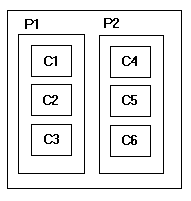
Nesting multiple panels with different combinations of horizontal and vertical gives an effect similar to GridBagLayout, without the complexity. The diagram shows two panels arranged horizontally, each of which contains 3 components arranged vertically.
The BoxLayout manager is constructed with an axis parameter that specifies the type of layout that will be done. There are four choices:
X_AXIS - Components are laid out horizontally from left to right.
Y_AXIS - Components are laid out vertically from top to bottom.
LINE_AXIS - Components are laid out the way words are laid out in a line, based on the container's ComponentOrientation property. If the container's ComponentOrientation is horizontal then components are laid out horizontally, otherwise they are laid out vertically. For horizontal orientations, if the container's ComponentOrientation is left to right then components are laid out left to right, otherwise they are laid out right to left. For vertical orientations components are always laid out from top to bottom.
PAGE_AXIS - Components are laid out the way text lines are laid out on a page, based on the container's ComponentOrientation property. If the container's ComponentOrientation is horizontal then components are laid out vertically, otherwise they are laid out horizontally. For horizontal orientations, if the container's ComponentOrientation is left to right then components are laid out left to right, otherwise they are laid out right to left. For vertical orientations components are always laid out from top to bottom.
For all directions, components are arranged in the same order as they were added to the container.
BoxLayout attempts to arrange components at their preferred widths (for horizontal layout) or heights (for vertical layout). For a horizontal layout, if not all the components are the same height, BoxLayout attempts to make all the components as high as the highest component. If that's not possible for a particular component, then BoxLayout aligns that component vertically, according to the component's Y alignment. By default, a component has a Y alignment of 0.5, which means that the vertical center of the component should have the same Y coordinate as the vertical centers of other components with 0.5 Y alignment.
Similarly, for a vertical layout,
BoxLayout attempts to make all components in the column
as wide as the widest component.
If that fails, it aligns them horizontally
according to their X alignments. For PAGE_AXIS layout,
horizontal alignment is done based on the leading edge of the component.
In other words, an X alignment value of 0.0 means the left edge of a
component if the container's ComponentOrientation is left to
right and it means the right edge of the component otherwise.
Instead of using BoxLayout directly, many programs use the Box class. The Box class is a lightweight container that uses a BoxLayout. It also provides handy methods to help you use BoxLayout well. Adding components to multiple nested boxes is a powerful way to get the arrangement you want.
For further information and examples see How to Use BoxLayout, a section in The Java Tutorial.
Warning:
Serialized objects of this class will not be compatible with
future Swing releases. The current serialization support is
appropriate for short term storage or RMI between applications running
the same version of Swing. As of 1.4, support for long term storage
of all JavaBeansTM
has been added to the java.beans package.
Please see XMLEncoder.
| Field Summary | |
|---|---|
static int |
LINE_AXIS
Specifies that components should be laid out in the direction of a line of text as determined by the target container's ComponentOrientation property. |
static int |
PAGE_AXIS
Specifies that components should be laid out in the direction that lines flow across a page as determined by the target container's ComponentOrientation property. |
static int |
X_AXIS
Specifies that components should be laid out left to right. |
static int |
Y_AXIS
Specifies that components should be laid out top to bottom. |
| Constructor Summary | |
|---|---|
BoxLayout(Container target,
          int axis)
Creates a layout manager that will lay out components along the given axis. |
|
| Method Summary | |
|---|---|
void |
addLayoutComponent(Component comp,
                   Object constraints)
Not used by this class. |
void |
addLayoutComponent(String name,
                   Component comp)
Not used by this class. |
int |
getAxis()
Returns the axis that was used to lay out components. |
float |
getLayoutAlignmentX(Container target)
Returns the alignment along the X axis for the container. |
float |
getLayoutAlignmentY(Container target)
Returns the alignment along the Y axis for the container. |
Container |
getTarget()
Returns the container that uses this layout manager. |
void |
invalidateLayout(Container target)
Indicates that a child has changed its layout related information, and thus any cached calculations should be flushed. |
void |
layoutContainer(Container target)
Called by the AWT when the specified container needs to be laid out. |
Dimension |
maximumLayoutSize(Container target)
Returns the maximum dimensions the target container can use to lay out the components it contains. |
Dimension |
minimumLayoutSize(Container target)
Returns the minimum dimensions needed to lay out the components contained in the specified target container. |
Dimension |
preferredLayoutSize(Container target)
Returns the preferred dimensions for this layout, given the components in the specified target container. |
void |
removeLayoutComponent(Component comp)
Not used by this class. |
| Methods inherited from class java.lang.Object |
|---|
clone, equals, finalize, getClass, hashCode, notify, notifyAll, toString, wait, wait, wait |
| Field Detail |
|---|
public static final int X_AXIS
public static final int Y_AXIS
public static final int LINE_AXIS
ComponentOrientation property.
public static final int PAGE_AXIS
ComponentOrientation property.
| Constructor Detail |
|---|
public BoxLayout(Container target,
                 int axis)
target - the container that needs to be laid outaxis - the axis to lay out components along. Can be one of:
BoxLayout.X_AXIS,
BoxLayout.Y_AXIS,
BoxLayout.LINE_AXIS or
BoxLayout.PAGE_AXIS
AWTError - if the value of axis is invalid| Method Detail |
|---|
public final Container getTarget()
public final int getAxis()
BoxLayout.X_AXIS,
BoxLayout.Y_AXIS,
BoxLayout.LINE_AXIS or
BoxLayout.PAGE_AXIS
public void invalidateLayout(Container target)
This method is called by AWT when the invalidate method is called on the Container. Since the invalidate method may be called asynchronously to the event thread, this method may be called asynchronously.
invalidateLayout in interface LayoutManager2target - the affected container
AWTError - if the target isn't the container specified to the
BoxLayout constructorpublic void addLayoutComponent(String name, Component comp)
addLayoutComponent in interface LayoutManagername - the name of the componentcomp - the componentpublic void removeLayoutComponent(Component comp)
removeLayoutComponent in interface LayoutManagercomp - the componentpublic void addLayoutComponent(Component comp, Object constraints)
addLayoutComponent in interface LayoutManager2comp - the componentconstraints - constraintspublic Dimension preferredLayoutSize(Container target)
preferredLayoutSize in interface LayoutManagertarget - the container that needs to be laid out
AWTError - if the target isn't the container specified to the
BoxLayout constructorContainer,
minimumLayoutSize(java.awt.Container),
maximumLayoutSize(java.awt.Container)public Dimension minimumLayoutSize(Container target)
minimumLayoutSize in interface LayoutManagertarget - the container that needs to be laid out
AWTError - if the target isn't the container specified to the
BoxLayout constructorpreferredLayoutSize(java.awt.Container),
maximumLayoutSize(java.awt.Container)public Dimension maximumLayoutSize(Container target)
maximumLayoutSize in interface LayoutManager2target - the container that needs to be laid out
AWTError - if the target isn't the container specified to the
BoxLayout constructorpreferredLayoutSize(java.awt.Container),
minimumLayoutSize(java.awt.Container)public float getLayoutAlignmentX(Container target)
getLayoutAlignmentX in interface LayoutManager2target - the container
AWTError - if the target isn't the container specified to the
BoxLayout constructorpublic float getLayoutAlignmentY(Container target)
getLayoutAlignmentY in interface LayoutManager2target - the container
AWTError - if the target isn't the container specified to the
BoxLayout constructorpublic void layoutContainer(Container target)
layoutContainer in interface LayoutManagertarget - the container to lay out
AWTError - if the target isn't the container specified to the
BoxLayout constructor

 javax.swing.BoxLayout