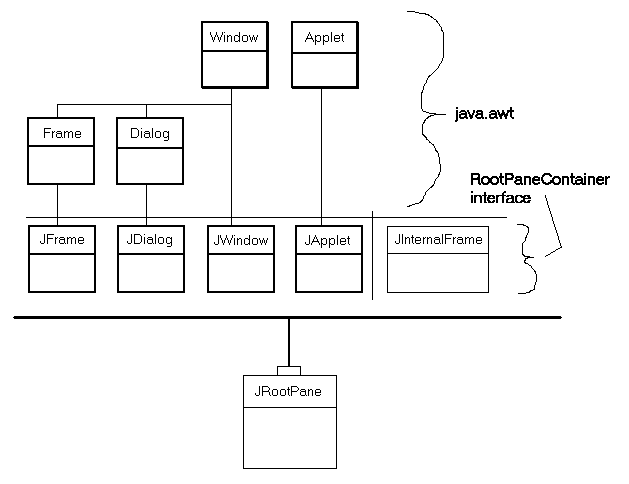
|
Préférences
Moteurs de recherche
|
||||||||||||||||||||||||||||||||||||||||||||||||||||||||||||||||||||||||||||||||||||||||||||||||||||||||||||||||||||||||||
| JavaTM 2 Platform Std. Ed. v1.6.0
javax.swing
|
|||||||||||||||||||||||||||||||||||||||||||||||||||||||||||||||||||||||||||||||||||||||||||||||||||||||||||||||||||||||||||
|
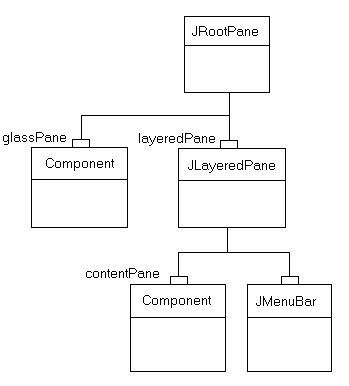
JRootPane.
A JRootpane is made up of a glassPane,
an optional menuBar, and a contentPane.
(The JLayeredPane manages the menuBar
and the contentPane.)
The glassPane sits over the top of everything,
where it is in a position to intercept mouse movements.
Since the glassPane (like the contentPane)
can be an arbitrary component, it is also possible to set up the
glassPane for drawing. Lines and images on the
glassPane can then range
over the frames underneath without being limited by their boundaries.
Although the menuBar component is optional,
the layeredPane, contentPane,
and glassPane always exist.
Attempting to set them to null generates an exception.
To add components to the JRootPane (other than the
optional menu bar), you add the object to the contentPane
of the JRootPane, like this:
rootPane.getContentPane().add(child);
The same principle holds true for setting layout managers, removing
components, listing children, etc. All these methods are invoked on
the contentPane instead of on the JRootPane.
Note: The default layout manager for theIf acontentPaneis aBorderLayoutmanager. However, theJRootPaneuses a customLayoutManager. So, when you want to change the layout manager for the components you added to aJRootPane, be sure to use code like this:rootPane.getContentPane().setLayout(new BoxLayout());
JMenuBar component is set on the JRootPane,
it is positioned along the upper edge of the frame.
The contentPane is adjusted in location and size to
fill the remaining area.
(The JMenuBar and the contentPane are added to the
layeredPane component at the
JLayeredPane.FRAME_CONTENT_LAYER layer.)
The layeredPane is the parent of all children in the
JRootPane -- both as the direct parent of the menu and
the grandparent of all components added to the contentPane.
It is an instance of JLayeredPane,
which provides the ability to add components at several layers.
This capability is very useful when working with menu popups,
dialog boxes, and dragging -- situations in which you need to place
a component on top of all other components in the pane.
The glassPane sits on top of all other components in the
JRootPane.
That provides a convenient place to draw above all other components,
and makes it possible to intercept mouse events,
which is useful both for dragging and for drawing.
Developers can use setVisible on the glassPane
to control when the glassPane displays over the other children.
By default the glassPane is not visible.
The custom LayoutManager used by JRootPane
ensures that:
glassPane fills the entire viewable
area of the JRootPane (bounds - insets).
layeredPane fills the entire viewable area of the
JRootPane. (bounds - insets)
menuBar is positioned at the upper edge of the
layeredPane.
contentPane fills the entire viewable area,
minus the menuBar, if present.
JRootPane view hierarchy are ignored.
If you replace the LayoutManager of the JRootPane,
you are responsible for managing all of these views.
So ordinarily you will want to be sure that you
change the layout manager for the contentPane rather than
for the JRootPane itself!
The painting architecture of Swing requires an opaque
JComponent
to exist in the containment hieararchy above all other components. This is
typically provided by way of the content pane. If you replace the content
pane, it is recommended that you make the content pane opaque
by way of setOpaque(true). Additionally, if the content pane
overrides paintComponent, it
will need to completely fill in the background in an opaque color in
paintComponent.
Warning: Swing is not thread safe. For more information see Swing's Threading Policy.
Warning:
Serialized objects of this class will not be compatible with
future Swing releases. The current serialization support is
appropriate for short term storage or RMI between applications running
the same version of Swing. As of 1.4, support for long term storage
of all JavaBeansTM
has been added to the java.beans package.
Please see XMLEncoder.
JLayeredPane,
JMenuBar,
JWindow,
JFrame,
JDialog,
JApplet,
JInternalFrame,
JComponent,
BoxLayout,
Mixing Heavy and Light Components| Nested Class Summary | |
|---|---|
protected class |
JRootPane.AccessibleJRootPane
This class implements accessibility support for the JRootPane class. |
protected class |
JRootPane.RootLayout
A custom layout manager that is responsible for the layout of layeredPane, glassPane, and menuBar. |
| Nested classes/interfaces inherited from class javax.swing.JComponent |
|---|
JComponent.AccessibleJComponent |
| Nested classes/interfaces inherited from class java.awt.Container |
|---|
Container.AccessibleAWTContainer |
| Nested classes/interfaces inherited from class java.awt.Component |
|---|
Component.AccessibleAWTComponent, Component.BaselineResizeBehavior, Component.BltBufferStrategy, Component.FlipBufferStrategy |
| Field Summary | |
|---|---|
static int |
COLOR_CHOOSER_DIALOG
Constant used for the windowDecorationStyle property. |
protected Container |
contentPane
The content pane. |
protected JButton |
defaultButton
The button that gets activated when the pane has the focus and a UI-specific action like pressing the Enter key occurs. |
protected javax.swing.JRootPane.DefaultAction |
defaultPressAction
Deprecated. As of Java 2 platform v1.3. |
protected javax.swing.JRootPane.DefaultAction |
defaultReleaseAction
Deprecated. As of Java 2 platform v1.3. |
static int |
ERROR_DIALOG
Constant used for the windowDecorationStyle property. |
static int |
FILE_CHOOSER_DIALOG
Constant used for the windowDecorationStyle property. |
static int |
FRAME
Constant used for the windowDecorationStyle property. |
protected Component |
glassPane
The glass pane that overlays the menu bar and content pane, so it can intercept mouse movements and such. |
static int |
INFORMATION_DIALOG
Constant used for the windowDecorationStyle property. |
protected JLayeredPane |
layeredPane
The layered pane that manages the menu bar and content pane. |
protected JMenuBar |
menuBar
The menu bar. |
static int |
NONE
Constant used for the windowDecorationStyle property. |
static int |
PLAIN_DIALOG
Constant used for the windowDecorationStyle property. |
static int |
QUESTION_DIALOG
Constant used for the windowDecorationStyle property. |
static int |
WARNING_DIALOG
Constant used for the windowDecorationStyle property. |
| Fields inherited from class javax.swing.JComponent |
|---|
accessibleContext, listenerList, TOOL_TIP_TEXT_KEY, ui, UNDEFINED_CONDITION, WHEN_ANCESTOR_OF_FOCUSED_COMPONENT, WHEN_FOCUSED, WHEN_IN_FOCUSED_WINDOW |
| Fields inherited from class java.awt.Component |
|---|
BOTTOM_ALIGNMENT, CENTER_ALIGNMENT, LEFT_ALIGNMENT, RIGHT_ALIGNMENT, TOP_ALIGNMENT |
| Fields inherited from interface java.awt.image.ImageObserver |
|---|
ABORT, ALLBITS, ERROR, FRAMEBITS, HEIGHT, PROPERTIES, SOMEBITS, WIDTH |
| Constructor Summary | |
|---|---|
JRootPane()
Creates a JRootPane, setting up its
glassPane, layeredPane,
and contentPane. |
|
| Method Summary | |
|---|---|
protected void |
addImpl(Component comp,
        Object constraints,
        int index)
Overridden to enforce the position of the glass component as the zero child. |
void |
addNotify()
Register ourselves with the SystemEventQueueUtils as a new
root pane. |
protected Container |
createContentPane()
Called by the constructor methods to create the default contentPane. |
protected Component |
createGlassPane()
Called by the constructor methods to create the default glassPane. |
protected JLayeredPane |
createLayeredPane()
Called by the constructor methods to create the default layeredPane. |
protected LayoutManager |
createRootLayout()
Called by the constructor methods to create the default layoutManager. |
AccessibleContext |
getAccessibleContext()
Gets the AccessibleContext associated with this
JRootPane. |
Container |
getContentPane()
Returns the content pane -- the container that holds the components parented by the root pane. |
JButton |
getDefaultButton()
Returns the value of the defaultButton property. |
Component |
getGlassPane()
Returns the current glass pane for this JRootPane. |
JMenuBar |
getJMenuBar()
Returns the menu bar from the layered pane. |
JLayeredPane |
getLayeredPane()
Gets the layered pane used by the root pane. |
JMenuBar |
getMenuBar()
Deprecated. As of Swing version 1.0.3 replaced by getJMenuBar(). |
RootPaneUI |
getUI()
Returns the L&F object that renders this component. |
String |
getUIClassID()
Returns a string that specifies the name of the L&F class that renders this component. |
int |
getWindowDecorationStyle()
Returns a constant identifying the type of Window decorations the JRootPane is providing. |
boolean |
isOptimizedDrawingEnabled()
The glassPane and contentPane
have the same bounds, which means JRootPane
does not tiles its children and this should return false. |
boolean |
isValidateRoot()
If a descendant of this JRootPane calls
revalidate, validate from here on down. |
protected String |
paramString()
Returns a string representation of this JRootPane. |
void |
removeNotify()
Unregister ourselves from SystemEventQueueUtils. |
void |
setContentPane(Container content)
Sets the content pane -- the container that holds the components parented by the root pane. |
void |
setDefaultButton(JButton defaultButton)
Sets the defaultButton property,
which determines the current default button for this JRootPane. |
void |
setDoubleBuffered(boolean aFlag)
Sets whether this component should use a buffer to paint. |
void |
setGlassPane(Component glass)
Sets a specified Component to be the glass pane for this
root pane. |
void |
setJMenuBar(JMenuBar menu)
Adds or changes the menu bar used in the layered pane. |
void |
setLayeredPane(JLayeredPane layered)
Sets the layered pane for the root pane. |
void |
setMenuBar(JMenuBar menu)
Deprecated. As of Swing version 1.0.3 replaced by setJMenuBar(JMenuBar menu). |
void |
setUI(RootPaneUI ui)
Sets the L&F object that renders this component. |
void |
setWindowDecorationStyle(int windowDecorationStyle)
Sets the type of Window decorations (such as borders, widgets for closing a Window, title ...) the JRootPane should
provide. |
void |
updateUI()
Resets the UI property to a value from the current look and feel. |
| Methods inherited from class java.lang.Object |
|---|
clone, equals, finalize, getClass, hashCode, notify, notifyAll, wait, wait, wait |
| Field Detail |
|---|
public static final int NONE
JRootPane should not provide any sort of
Window decorations.
public static final int FRAME
JRootPane should provide decorations appropriate for
a Frame.
public static final int PLAIN_DIALOG
JRootPane should provide decorations appropriate for
a Dialog.
public static final int INFORMATION_DIALOG
JRootPane should provide decorations appropriate for
a Dialog used to display an informational message.
public static final int ERROR_DIALOG
JRootPane should provide decorations appropriate for
a Dialog used to display an error message.
public static final int COLOR_CHOOSER_DIALOG
JRootPane should provide decorations appropriate for
a Dialog used to display a JColorChooser.
public static final int FILE_CHOOSER_DIALOG
JRootPane should provide decorations appropriate for
a Dialog used to display a JFileChooser.
public static final int QUESTION_DIALOG
JRootPane should provide decorations appropriate for
a Dialog used to present a question to the user.
public static final int WARNING_DIALOG
JRootPane should provide decorations appropriate for
a Dialog used to display a warning message.
protected JMenuBar menuBar
protected Container contentPane
protected JLayeredPane layeredPane
protected Component glassPane
protected JButton defaultButton
@Deprecated
protected javax.swing.JRootPane.DefaultAction defaultPressAction
Action
in the JRootPane's ActionMap. Please refer to
the key bindings specification for further details.
defaultButton@Deprecated protected javax.swing.JRootPane.DefaultAction defaultReleaseAction
Action
in the JRootPane's ActionMap. Please refer to
the key bindings specification for further details.
defaultButton| Constructor Detail |
|---|
public JRootPane()
JRootPane, setting up its
glassPane, layeredPane,
and contentPane.
| Method Detail |
|---|
public void setDoubleBuffered(boolean aFlag)
Component is buffered and one of its ancestor
is also buffered, the ancestor buffer will be used.
setDoubleBuffered in class JComponentaFlag - if true, set this component to be double bufferedpublic int getWindowDecorationStyle()
JRootPane is providing.
NONE, FRAME,
PLAIN_DIALOG, INFORMATION_DIALOG,
ERROR_DIALOG, COLOR_CHOOSER_DIALOG,
FILE_CHOOSER_DIALOG, QUESTION_DIALOG or
WARNING_DIALOG.setWindowDecorationStyle(int)public void setWindowDecorationStyle(int windowDecorationStyle)
JRootPane should
provide. The default is to provide no Window decorations
(NONE).
This is only a hint, and some look and feels may not support this. This is a bound property.
windowDecorationStyle - Constant identifying Window decorations
to provide.
IllegalArgumentException - if style is
not one of: NONE, FRAME,
PLAIN_DIALOG, INFORMATION_DIALOG,
ERROR_DIALOG, COLOR_CHOOSER_DIALOG,
FILE_CHOOSER_DIALOG, QUESTION_DIALOG, or
WARNING_DIALOG.JDialog.setDefaultLookAndFeelDecorated(boolean),
JFrame.setDefaultLookAndFeelDecorated(boolean),
LookAndFeel.getSupportsWindowDecorations()public RootPaneUI getUI()
LabelUI objectpublic void setUI(RootPaneUI ui)
ui - the LabelUI L&F objectUIDefaults.getUI(javax.swing.JComponent)public void updateUI()
updateUI in class JComponentJComponent.updateUI()public String getUIClassID()
getUIClassID in class JComponentJComponent.getUIClassID(),
UIDefaults.getUI(javax.swing.JComponent)protected JLayeredPane createLayeredPane()
layeredPane.
Bt default it creates a new JLayeredPane.
layeredPaneprotected Container createContentPane()
contentPane.
By default this method creates a new JComponent add sets a
BorderLayout as its LayoutManager.
contentPaneprotected Component createGlassPane()
glassPane.
By default this method creates a new JComponent
with visibility set to false.
glassPaneprotected LayoutManager createRootLayout()
layoutManager.
layoutManager.public void setJMenuBar(JMenuBar menu)
menu - the JMenuBar to add@Deprecated public void setMenuBar(JMenuBar menu)
setJMenuBar(JMenuBar menu).
menu - the JMenuBar to add.public JMenuBar getJMenuBar()
JMenuBar used in the pane@Deprecated public JMenuBar getMenuBar()
getJMenuBar().
JMenuBar used in the panepublic void setContentPane(Container content)
Swing's painting architecture requires an opaque JComponent
in the containment hiearchy. This is typically provided by the
content pane. If you replace the content pane it is recommended you
replace it with an opaque JComponent.
content - the Container to use for component-contents
IllegalComponentStateException - (a runtime
exception) if the content pane parameter is nullpublic Container getContentPane()
Container that holds the component-contentspublic void setLayeredPane(JLayeredPane layered)
JMenuBar.
layered - the JLayeredPane to use
IllegalComponentStateException - (a runtime
exception) if the layered pane parameter is nullpublic JLayeredPane getLayeredPane()
JMenuBar.
JLayeredPane currently in usepublic void setGlassPane(Component glass)
Component to be the glass pane for this
root pane. The glass pane should normally be a lightweight,
transparent component, because it will be made visible when
ever the root pane needs to grab input events.
The new glass pane's visibility is changed to match that of the current glass pane. An implication of this is that care must be taken when you want to replace the glass pane and make it visible. Either of the following will work:
   root.setGlassPane(newGlassPane);
   newGlassPane.setVisible(true);
or:
   root.getGlassPane().setVisible(true);
   root.setGlassPane(newGlassPane);
glass - the Component to use as the glass pane
for this JRootPane
NullPointerException - if the glass parameter is
nullpublic Component getGlassPane()
JRootPane.
setGlassPane(java.awt.Component)public boolean isValidateRoot()
JRootPane calls
revalidate, validate from here on down.
Deferred requests to layout a component and its descendents again.
For example, calls to revalidate, are pushed upwards to
either a JRootPane or a JScrollPane
because both classes override isValidateRoot to return true.
isValidateRoot in class JComponentJComponent.isValidateRoot()public boolean isOptimizedDrawingEnabled()
glassPane and contentPane
have the same bounds, which means JRootPane
does not tiles its children and this should return false.
On the other hand, the glassPane
is normally not visible, and so this can return true if the
glassPane isn't visible. Therefore, the
return value here depends upon the visiblity of the
glassPane.
isOptimizedDrawingEnabled in class JComponentpublic void addNotify()
SystemEventQueueUtils as a new
root pane.
addNotify in class JComponentpublic void removeNotify()
SystemEventQueueUtils.
removeNotify in class JComponentaddNotify()public void setDefaultButton(JButton defaultButton)
defaultButton property,
which determines the current default button for this JRootPane.
The default button is the button which will be activated
when a UI-defined activation event (typically the Enter key)
occurs in the root pane regardless of whether or not the button
has keyboard focus (unless there is another component within
the root pane which consumes the activation event,
such as a JTextPane).
For default activation to work, the button must be an enabled
descendent of the root pane when activation occurs.
To remove a default button from this root pane, set this
property to null.
defaultButton - the JButton which is to be the default buttonJButton.isDefaultButton()public JButton getDefaultButton()
defaultButton property.
JButton which is currently the default buttonsetDefaultButton(javax.swing.JButton)protected void addImpl(Component comp, Object constraints, int index)
comp - the component to be enhancedconstraints - the constraints to be respectedindex - the indexContainer.add(Component),
Container.add(Component, int),
Container.add(Component, java.lang.Object),
LayoutManager,
LayoutManager2protected String paramString()
JRootPane.
This method is intended to be used only for debugging purposes,
and the content and format of the returned string may vary between
implementations. The returned string may be empty but may not
be null.
paramString in class JComponentJRootPane.public AccessibleContext getAccessibleContext()
AccessibleContext associated with this
JRootPane. For root panes, the
AccessibleContext takes the form of an
AccessibleJRootPane.
A new AccessibleJRootPane instance is created if necessary.
getAccessibleContext in interface AccessiblegetAccessibleContext in class JComponentAccessibleJRootPane that serves as the
AccessibleContext of this JRootPane